HDMI eARC explained: The secret to perfect cinema sound with your projector
September 11, 2025
Imagine: a razor-sharp, massive 4K image fills yourgiant screenYou are right in the middle of the action, and the picture quality is breathtaking. But what about the sound? True cinematic enjoyment only happens when the audio is just as immersive and impressive as the visuals. But how can you achieve that without running a complicated tangle of cables through your living room?
The answer lies in a technology called HDMI eARC. In this guide, we explain everything you need to know about it—from the basics to choosing the right cables. Our special focus is on how you can use eARC to achieve the ultimate audio experience in a modern,projector-based home theaterachieve.
What is HDMI eARC? A simple explanation
To understand eARC, we first need to briefly discuss its predecessor: ARC.
From ARC to eARC: The Evolution of Audio Signal
ARC stands forAudio Return Channel. This smart feature, found in many older HDMI ports, allows a TV or projector to transmit the audio signal to a soundbar or AV receiver using the same HDMI cable that receives the video.to return. This was convenient, but the bandwidth was limited, so only compressed audio formats such as Dolby Digital could be transmitted.
eARC stands forEnhanced Audio Return Channel. It is the next generation of this technology and addresses the biggest issue of ARC: limited bandwidth. You can think of it as a multi-lane highway compared to a country road – eARC can handle a much larger amount of audio data.
The main advantage: Uncompressed cinema sound as in the original
This significantly higher bandwidth is the key advantage of eARC. It enables the transmission of lossless, high-resolution audio formats exactly as they were mixed in the studio. This includes immersive 3D audio formats also used in modern cinemas:
- Dolby Atmos
- DTS:X
Only with eARC can you enjoy these formats in their full, uncompressed quality and experience sound coming not just from the front, but also from the sides, from behind, and even from above.
When do you need eARC? Key use cases
eARC is not just a technical feature, but a necessity for anyone looking to get the most out of their modern entertainment system.
For immersive movie experiences (4K Blu-ray & streaming)
Services such as Netflix, Disney+, and Amazon Prime Video stream many of their latest movies and series with Dolby Atmos sound. Also4K Blu-raysoffer these audio tracks as standard. To transmit this full audio quality from your streaming device through your projector to your soundbar, eARC is essential.
For next-gen gaming (PS5 & Xbox Series X)
Modern gaming consoles such as PlayStation 5 and Xbox Series X create complex 3D soundscapes that can give you a real advantage in gameplay. To transmit this spatial audio to your sound system without loss, you need eARC.
For a clean setup with minimal cables
Perhaps the most elegant advantage: eARC reduces cable clutter. A single HDMI cable between your projector and your soundbar or AV receiver is all you need to receive the highest quality video signal and send back audio in the best possible quality.
The right setup: How to connect your devices with eARC
While most guides focus on televisions, the true potential of eARC lies in a modern projector home theater.
The components: What you need
To set up an eARC system, you need four things:
- A source device (e.g. Apple TV 4K, PS5, 4K Blu-ray player)
- A display device with an eARC port (such as a premium projector)
- A soundbar or an AV receiver with an eARC port
- The right HDMI cable
The projector as the central hub
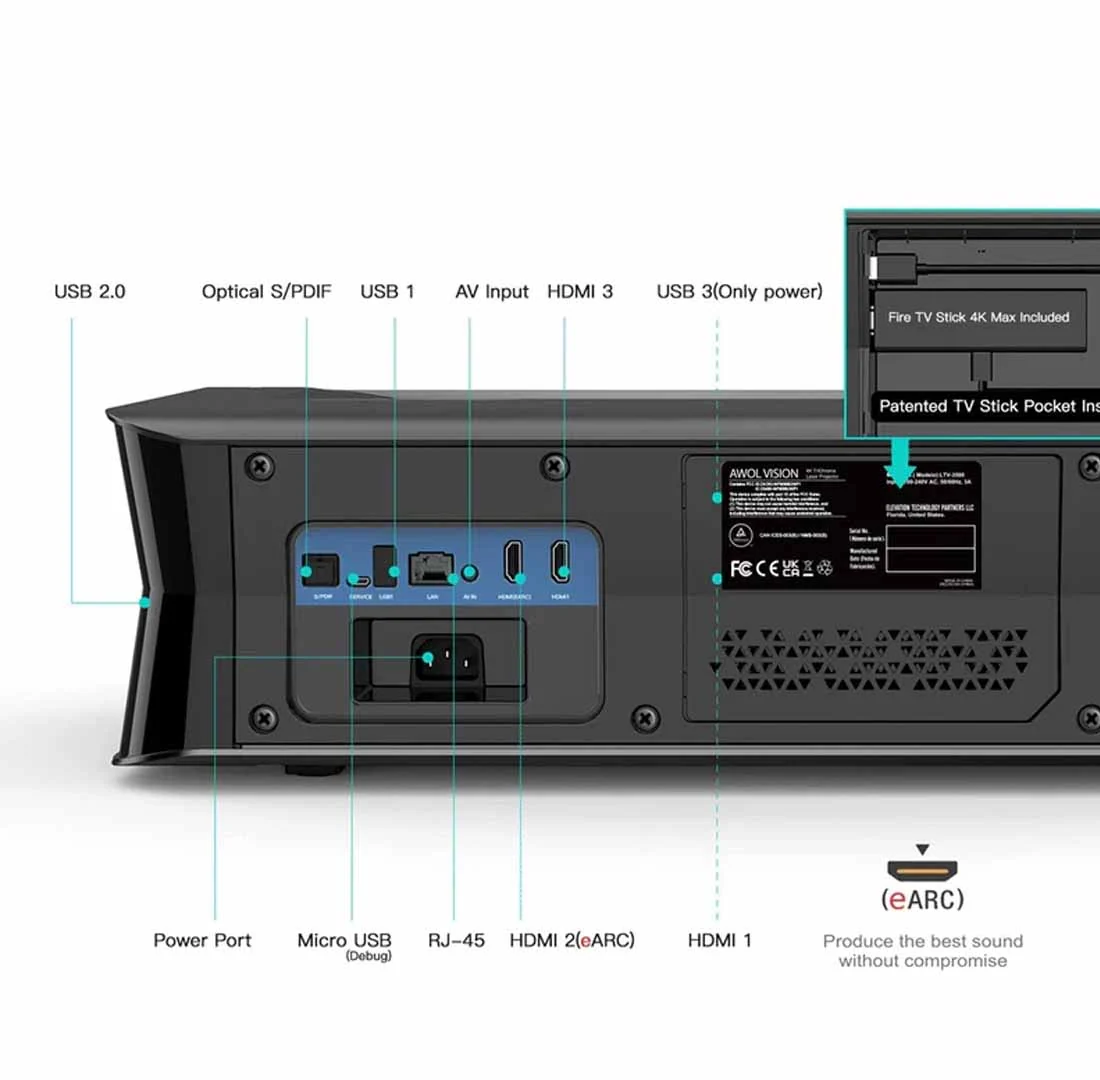
In a premium home theater setup, the projector serves as the central hub for all your devices. The signal path with aUltra-short throw projectorsuch as the AWOL Vision LTV-3500 Pro is a perfect example:
A source device such as a 4K player is connected to one of the standard HDMI inputs of the LTV-3500 Pro. The projector processes the4K Dolby Vision video signaland projects it onto the screen. At the same time, it transmits the untouched, uncompressed Dolby Atmos audio signal via its dedicatedHDMI eARC portto a connected soundbar. The projector thus becomes the high-tech hub of your entire system.
Which HDMI cable for eARC? (A frequently asked question answered)
There is a clear answer to this:No, not every HDMI cable supports eARC.Since eARC transmits such a large amount of data, you need a cable that can handle it. Look for one of the following labels:
- HDMI cable with Ethernet
- Ultra High Speed HDMI cable(recommended for full future-proofing)
These cables feature the necessary data channels to support the high bandwidth of eARC.
Common Issues and Solutions (Troubleshooting)
If eARC does not work immediately, it is often due to minor settings.
No sound? Check these settings
- Make sure that eARC (sometimes also referred to as HDMI-CEC) is enabled in the settings menusallDevices are activated – that is, in the projector, the soundbar, and the source device.
- Check that the HDMI cable is connected to the ports explicitly labeled "eARC" or "ARC".
- Make sure that the input on your soundbar or AV receiver is set to "eARC" or "TV".
Audio dropouts or interference?
The most common cause of unstable audio with an eARC connection is an inadequate or faulty cable. Test the connection with another certified Ultra High Speed HDMI cable to rule this out as the source of the issue.
Conclusion: Why eARC Is Essential for Your Home Theater
eARC is more than just a technical acronym; it is the key to true cinematic sound in your own home. It is the modern standard for lossless, immersive audio such as Dolby Atmos and an absolute must for any high-quality home theater.
While often discussed in the context of televisions, eARC truly shows its full potential in a projector-based home theater. It allows an advanced device like the AWOL Vision LTV-3500 Pro to serve as the centerpiece of a powerful and elegantly streamlined system—one where the audio is finally as breathtaking as the picture.
Discover More Insights